Convert Financial Documents To Excel
AI-powered OCR for receipts, statements, invoices, paystubs, and tables
Export as Excel, CSV, PDF, Word, JSON, or XML
0/50 daily conversions
No registration required โข All document types โข Completely free
Privacy First: Your images are never stored - processed instantly and discarded
How ScanToExcel Works
Convert any document to structured data in three simple steps
Upload Your Document
Drag and drop or select files from your device. We support JPG, PNG, HEIC, HEIF, and PDF formats up to 50 files at once.
AI Extracts the Data
Our advanced OCR technology reads your document in seconds, identifying text, numbers, dates, line items, and totals with high accuracy.
Download Your File
Choose your preferred format - Excel, CSV, PDF, Word, JSON, or XML - and download instantly. Ready for analysis or import into other tools.
See Document Conversion in Action
Works with receipts, bank statements, invoices, bills, credit card statements, and image tables
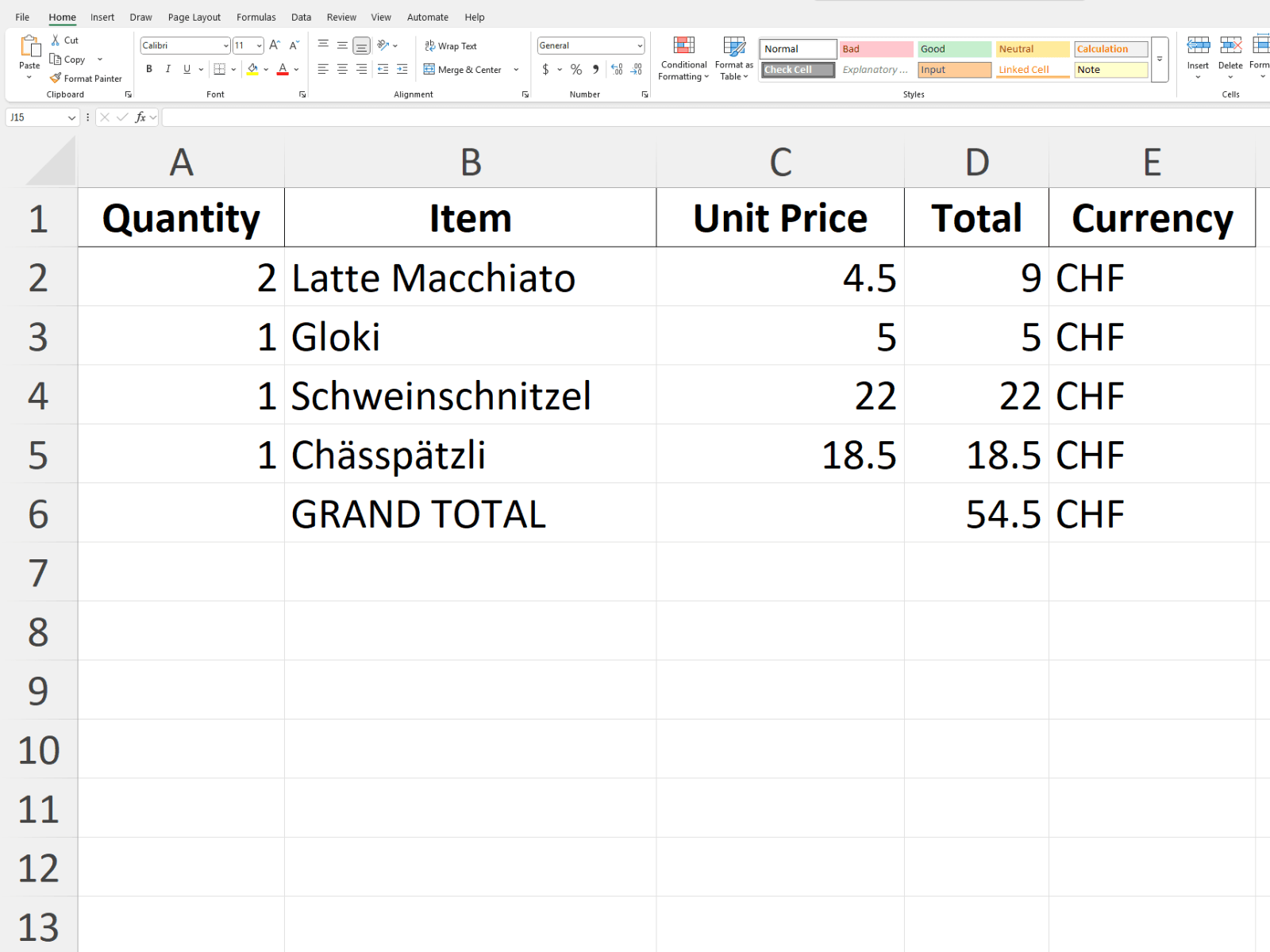
Upload your receipt photo
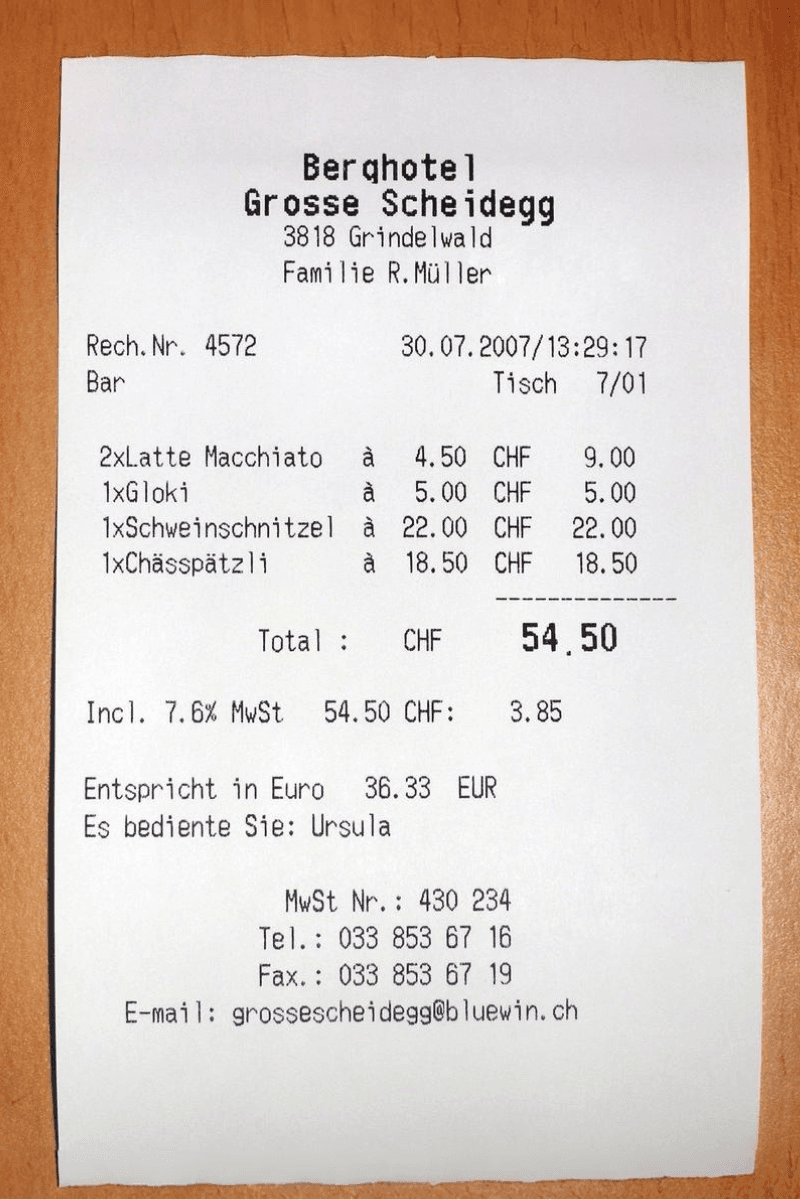
Get itemized Excel spreadsheet
Popular Use Cases
Discover how ScanToExcel can streamline your financial document processing workflow. Convert receipts, bank statements, invoices, and more to Excel and other formats instantly.
Receipt to Excel
Convert receipt photos to organized spreadsheets for expense tracking
Bank Statement to Excel
Extract transactions from bank statements for financial analysis
Invoice to Excel
Digitize invoices and bills for accounts payable management
Credit Card Statement to Excel
Convert credit card statements for expense categorization
Paystub to Excel
Extract paystub, paycheck, and payslip earnings and deductions
Image Table to Word
Extract image tables to Word documents
PDF Table to Excel
Extract tables from PDF documents to Excel spreadsheets
Image Table to Excel
Convert scanned tables and whiteboard photos to Excel
Camera Image to Excel
Snap photos with your phone and convert to Excel instantly
Documents to JSON
Convert financial documents to JSON for data science and APIs
Documents to XML
Convert to XML for ERP systems and enterprise integration
PDF Tables to Word
Extract PDF tables into editable Word documents
What We Convert
Input Documents
Receipts
Bank Statements
Invoices & Bills
Credit Card Statements
Paystubs & Payslips
Table Images
Export Formats
Excel
CSV
Word
JSON
XML
Who Uses ScanToExcel?
Trusted by professionals across industries to save time on manual data entry
Freelancers & Contractors
Track project expenses, organize receipts for tax season, and create professional expense reports without expensive software.
Small Business Owners
Digitize invoices, track vendor payments, and keep financial records organized. Import directly into QuickBooks or Excel.
Accountants & Bookkeepers
Process client documents faster. Extract data from bank statements, credit card bills, and invoices in seconds instead of hours.
Business Travelers
Snap photos of receipts on the go. Convert hotel bills, restaurant receipts, and travel expenses for easy reimbursement.
Researchers & Students
Extract data from printed tables, convert PDF charts to spreadsheets, and organize research data without manual typing.
Developers & Data Scientists
Use JSON output for API integration. Extract structured data from financial documents for analysis and automation.
Why Choose ScanToExcel?
Built for speed, accuracy, and privacy - without the price tag
100% Free
No hidden fees, no credit card required, no premium tiers. Get 50 free conversions every day without creating an account.
Lightning Fast
Most documents process in under 3 seconds. No waiting in queues - upload, process, and download immediately.
Privacy First
Your documents are processed in memory and never stored on our servers. We don't keep copies, logs, or any trace of your files.
AI-Powered Accuracy
Advanced machine learning models trained on millions of documents deliver reliable extraction even from poor-quality scans.
Works Everywhere
Fully responsive design works on desktop, tablet, and mobile. Snap a receipt on your phone and convert it on the spot.
Batch Processing
Process up to 50 documents at once. Perfect for end-of-month expense reports or digitizing stacks of old receipts.
No Ads, Ever
Enjoy a clean, distraction-free experience. We don't show ads, pop-ups, or promotional banners - just the tools you need.
No Signup Required
Start converting documents immediately. No email, no password, no account creation - just upload and go.
6 Document Types
Upload receipts, bank statements, invoices, credit card statements, paystubs, or any image with tables. We handle them all.
6 Export Formats
Export to Excel, CSV, PDF, Word, JSON, or XML. Choose the format that fits your workflow or integrate with any system.
Empowering Modern Offices
ScanToExcel is more than just a free OCR tool: it's a digital transformation partner for modern offices, accountants, and business professionals. Whether you're automating expense reports, digitizing paystubs, or extracting tables for financial analysis, our platform streamlines your workflow and eliminates manual data entry. Trusted by thousands of users worldwide, ScanToExcel helps organizations of all sizes save time, reduce errors, and unlock the full value of their documents.
In today's fast-paced business world, efficiency and accuracy are essential. ScanToExcel empowers office teams to convert receipts, invoices, paystubs, and tables into actionable data for Excel, Word, Outlook, and more. Our AI-powered OCR is designed for seamless integration into your daily workflow - whether you're a finance professional, HR manager, or small business owner. Experience the freedom of paperless productivity and join the movement toward smarter, more connected offices.
Frequently Asked Questions
Is ScanToExcel really free?
Yes, completely free. You get 50 document conversions per day with no signup, no credit card, and no hidden fees. The quota resets every 24 hours.
What file formats can I upload?
We accept JPG, PNG, HEIC, HEIF images and PDF documents. For best results, ensure your documents are clearly photographed or scanned with good lighting and minimal blur.
What export formats are available?
You can export to Excel (.xlsx), CSV, PDF, Word (.docx), JSON, OR XML. Choose the format that works best for your workflow or the software you're importing into.
Is my data secure?
Absolutely. Your files are processed in memory and immediately discarded after conversion. We never store, log, or retain any of your documents or extracted data.
How accurate is the OCR extraction?
Our AI-powered OCR works well for clear, printed documents. Accuracy depends on image quality - better lighting, focus, and resolution lead to better results. Handwritten text may have lower accuracy.
Can I process multiple files at once?
Yes! You can upload and process up to 50 files in a single batch. Each file counts as one conversion toward your daily quota.
The Complete Guide to Document OCR and Data Extraction
ScanToExcel is your comprehensive solution for converting scanned documents, photos, and PDFs into editable, structured data formats. Whether you're a small business owner tracking expenses, an accountant managing client invoices, or a data analyst processing financial documents, our AI-powered OCR technology makes document digitization effortless.
What is OCR and Why Does It Matter?
Optical Character Recognition (OCR) is a technology that converts different types of documents - such as scanned paper documents, PDF files, or images captured by a digital camera - into editable and searchable data. Traditional OCR simply extracts text, but ScanToExcel goes further by understanding document structure, extracting tables, and organizing data into spreadsheet-ready formats.
Document Types We Support
Our intelligent extraction engine handles a wide variety of financial and business documents:
- Receipts - Grocery receipts, restaurant bills, fuel receipts, retail purchases, and more
- Bank Statements - Monthly statements from any bank with transaction details
- Invoices - Vendor invoices, utility bills, service invoices with line items
- Credit Card Statements - Complete transaction history with categories
- Paystubs - Earnings, deductions, taxes, and net pay information
- PDF Tables - Any tabular data embedded in PDF documents
- Image Tables - Photos of whiteboards, printed tables, or handwritten tables
Export Formats for Every Workflow
We understand that different use cases require different output formats. That's why ScanToExcel supports:
- Excel (.xlsx) - Perfect for financial analysis, bookkeeping, and data manipulation
- CSV - Universal format for importing into accounting software, databases, or other tools
- Word (.docx) - Ideal for reports and documentation that need formatted tables
- PDF - For archiving or sharing extracted data in a portable format
- JSON - Structured data format for developers, APIs, and data science workflows
- XML - Enterprise-ready format for ERP systems and B2B integrations
Use Cases Across Industries
ScanToExcel serves professionals across many industries:
- Accounting & Bookkeeping - Digitize client receipts, invoices, and bank statements for faster reconciliation
- Small Business - Track expenses, manage invoices, and maintain organized financial records
- Healthcare - Extract billing information from medical invoices and insurance documents
- Real Estate - Process rent receipts, property invoices, and financial statements
- Legal - Convert financial discovery documents into searchable, analyzable formats
- Education - Digitize expense reports, grant documentation, and administrative records
- Personal Finance - Track spending, organize tax documents, and manage household budgets
Privacy-First Document Processing
Your documents contain sensitive financial information, and we take that responsibility seriously. ScanToExcel processes all files in memory without storing them on our servers. Once your conversion is complete, your original files and extracted data are immediately discarded. We don't log, analyze, or retain any of your document content - ever.
How Our AI Technology Works
Unlike basic OCR tools that simply extract raw text, ScanToExcel uses advanced machine learning models trained specifically for financial document understanding. Our system recognizes document types automatically, identifies key fields (dates, amounts, vendors, line items), and structures the data into clean, organized spreadsheets. This intelligent extraction means less manual cleanup and more accurate results.
Getting Started Is Easy
Simply upload your document - whether it's a photo from your phone, a scanned PDF, or a digital file - and our AI will analyze it within seconds. Review the extracted data, make any adjustments if needed, and download in your preferred format. No account required, no software to install, and completely free for up to 50 conversions per day.
Ready to transform your document workflow? Start converting documents now โ