Convert Bank Statements to Excel

Upload bank statement PDFs or images and extract every transaction — dates, descriptions, debits, credits, and running balances — into organized Excel spreadsheets with AI-powered OCR

ZIP
Email

0/10 daily document conversions

Start free instantly • All document types • No signup required

Privacy First: Your images are never stored - processed instantly and discarded

Turn Statement PDFs Into Transaction Spreadsheets

What You Need

  • A bank statement PDF, scanned document, or photo — single or multi-page
  • Any device with a browser — desktop, tablet, or phone
  • No account needed — convert up to 10 statements per day for free

Upload. Extract. Reconcile.

1

Submit Your Bank Statement

Drag and drop a bank statement PDF, scanned image, or photograph. Multi-page PDFs are handled automatically — no need to split them. Select your output format: Excel, CSV, PDF, Word, JSON, or XML.

2

AI Maps Every Transaction Row

The AI reads the statement and extracts every transaction with date, description, debit amount, credit amount, and running balance. It also captures the account holder, bank name, statement period, opening and closing balances, and currency — all processed in memory with zero data retention.

3

Export Your Transaction Data

Download the structured transaction data instantly. Excel and CSV contain every transaction in clean rows with separate debit and credit columns, plus summary totals. Batch uploads produce individual files or a ZIP archive.

Bank Statement to Excel

Upload bank statement PDF

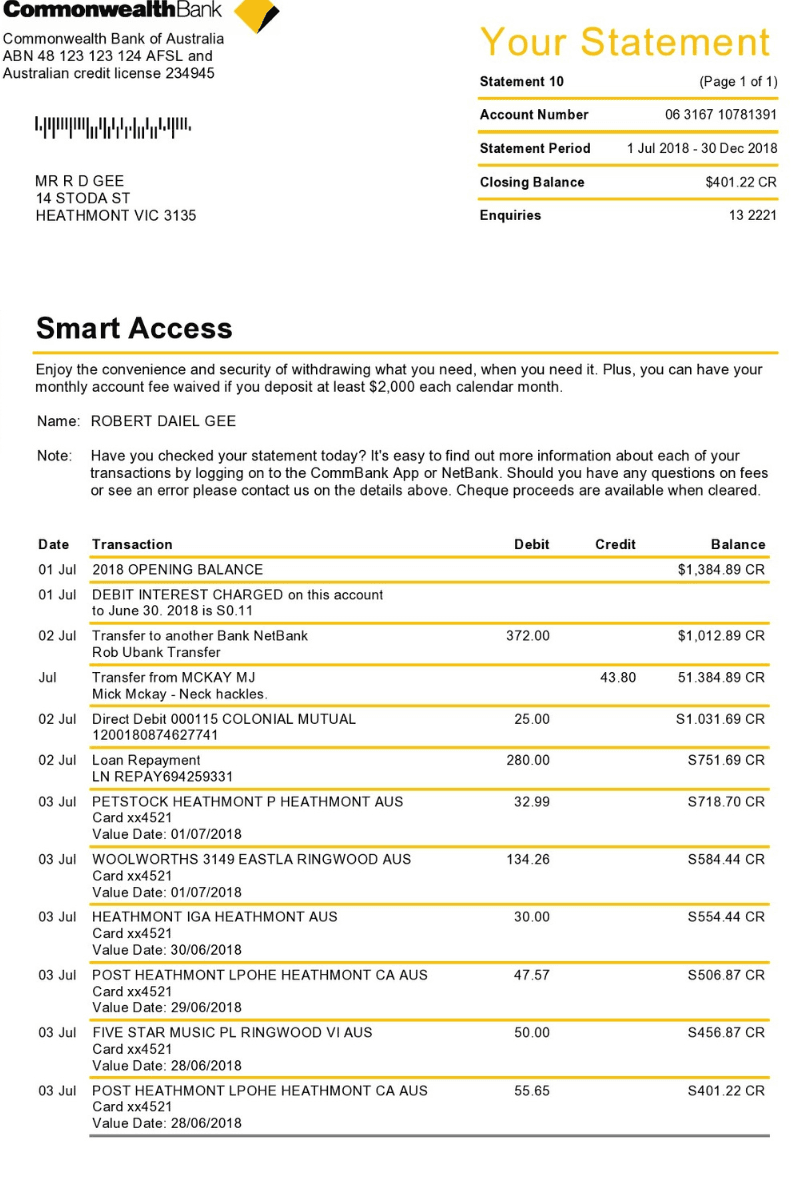
Bank statement PDF showing account transactions with dates, descriptions, debits, and credits

Get organized transaction data

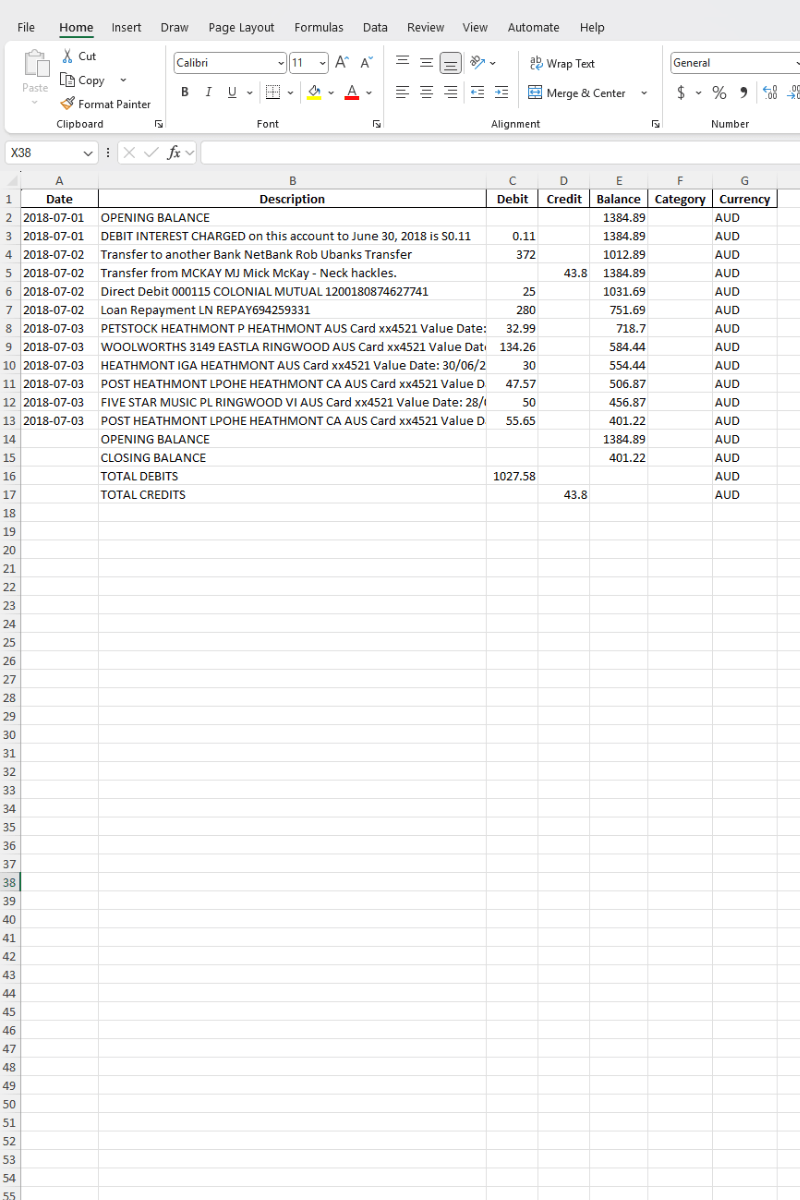
Bank statement data converted to Excel spreadsheet with organized columns for transactions, debits, credits, and balances

Every Bank. Every Format. One Converter.

Whether it is a single-page monthly summary or a 30-page annual export, the AI reads the layout automatically and pulls every transaction into structured rows.

🏦

Checking & Savings Accounts

Monthly or quarterly statements with deposits, withdrawals, transfers, and fees organized into clean debit and credit columns.

🏢

Business & Commercial Accounts

High-volume statements with hundreds of transactions — payroll, vendor payments, ACH transfers, and wire transactions.

🌐

International & Multi-Currency

Statements from banks worldwide in any currency. The AI detects the currency automatically from symbols, codes, or bank details.

📱

Online & Digital Banks

PDF exports from online-only banks and fintech platforms with modern layouts, transaction categories, and digital formatting.

🏛️

Credit Unions & Community Banks

Statements from local institutions with varied layouts — the AI adapts to each format and extracts transaction data consistently.

📄

Scanned Paper Statements

Photos or scans of printed statements, including older documents with faded text, stamps, or handwritten annotations.

What Makes It Work on Any Statement

Separates debits and credits into distinct columns automatically
Verifies totals: opening balance + credits − debits = closing balance
Masks account numbers to last four digits for privacy
Detects currency from symbols, ISO codes, or bank location
Excel and CSV with Date, Description, Debit, Credit, Balance columns
JSON with account holder, bank name, period, and transaction arrays
Opening balance, closing balance, total debits, total credits in every export
Batch upload up to 3, 10, or 50 statements per plan

Bank-Grade Privacy for Bank Statements

Your bank statements contain some of the most sensitive data you own. Here is how ScanToExcel protects it.

🔒

Zero Data Retention

Files are processed entirely in memory and deleted the moment your download is ready. Nothing touches a disk.

🛡️

Account Numbers Masked

Only the last four digits of account numbers are extracted. The full number is never stored or transmitted.

🚫

No Account Required

No email, no password, no tracking cookies. Convert bank statements without creating an account or signing in.

🌍

GDPR Compliant

The entire pipeline follows a privacy-first architecture. No data is logged, cached, shared, or sold.

How the AI Reads Your Bank Statement

Each region of the document maps to specific fields in your output spreadsheet.

📋

Statement Header

  • Bank name
  • Account holder
  • Account number (last 4 digits)
  • Statement period (start and end dates)
📊

Transaction Table

  • Date for each transaction
  • Description or memo
  • Debit amount (money out)
  • Credit amount (money in)
  • Running balance after each entry
  • Category (when the statement includes one)
📄

Statement Summary

  • Opening balance
  • Closing balance
  • Total debits for the period
  • Total credits for the period
  • Currency (detected from symbols, codes, or bank location)

Every field is optional — the AI extracts whatever is present and leaves the rest blank. No data is fabricated.

Maximize Your Statement Accuracy

Most bank statements arrive as PDFs — upload them directly for the best results. For paper statements, these tips help maximize accuracy.

  1. 1

    Upload the original PDF when possible

    PDF-native text gives the AI a lossless source — no OCR noise from scanning

  2. 2

    Multi-page? Upload the full file

    The AI merges transactions across all pages automatically — no need to split

  3. 3

    Scans: use 300 DPI or higher

    Higher resolution means sharper text, especially for small transaction details

  4. 4

    Include the full document

    Capture from account header through closing balance — cropping can lose summary totals

  5. 5

    Avoid glare on glossy paper

    If photographing, use diffused lighting to prevent hotspots on coated stock

  6. 6

    Older statements are fine

    The AI can read faded print and yellowed paper from archived statements

Choose Your Plan

All plans include all document types, input formats & export formats.

Current Plan
🆓

Free

$0

Perfect for occasional use. No account needed.

  • 10 conversions per day
  • Up to 3 files per batch
  • Receipts, invoices, bank & credit card statements, paystubs, table images
  • Scanned PDFs, text PDFs, multi-page PDFs, JPG, PNG, HEIC, WebP & more
  • Export to Excel, CSV, Word, PDF, XML, JSON
  • Privacy first: files & output are never stored

Free+

$0

Double your daily limit with a free account.

  • 20 conversions per day
  • Up to 10 files per batch
  • ZIP download for batch files
  • Email delivery of results
  • Everything in Free
Most Popular
👑

Premium

$4.99/mo

For power users who need maximum conversions.

  • Unlimited conversions
  • Up to 50 files per batch
  • Enhanced AI model for better accuracy
  • Parallel processing — 3x faster batches
  • Priority email support
  • Billed monthly, cancel anytime
  • Everything in Free+

Bank Statement Conversion Questions

What data does ScanToExcel extract from bank statements?
The AI extracts every transaction with date, description, debit amount, credit amount, and running balance. It also identifies the account holder name, bank name, account number (last four digits only), statement period, opening balance, closing balance, total debits, total credits, and currency. All data is structured into clean Excel rows.
Which banks and statement formats are supported?
ScanToExcel works with any bank statement that comes as a PDF or image. The AI reads the document layout and extracts transaction data regardless of which bank issued it. This includes statements from major retail banks, online banks, credit unions, and international institutions in any currency.
Can I process multi-page bank statement PDFs?
Yes. Upload the full PDF and the AI processes all pages as a single document. Transactions from every page are combined into one output file with consistent columns. There is no need to split the PDF beforehand.
How does ScanToExcel separate debits from credits?
The AI identifies debits and credits by analyzing the statement layout, column headers, signs, and balance changes. Withdrawals, payments, and fees go into the Debit column. Deposits, transfers in, and refunds go into the Credit column. Each transaction also shows the running balance for verification.
Is my bank statement data stored or shared?
No. All processing happens in memory and files are discarded the moment your download is ready. Nothing is logged, cached, or retained. ScanToExcel follows a privacy-first architecture that is fully GDPR compliant. No account creation is required.

Stop Retyping Transactions. Start Extracting.

Upload your first statement and see structured transactions in seconds. No signup, no credit card — just download and start reconciling.

Convert Your First Statement →
Bank Statement to Excel Converter | Free OCR Parser | ScanToExcel